New · Multi-Event SchedulingLearn More

Every screen in the building,
run from one quiet tab.

Schedule a week of programming in twenty minutes. No USB sticks, no reboots, no walking to the lobby TV. One change updates every display in under fifteen seconds.

M
H
A
K
1,200+ venues run Clarra today
G2
4.9 · 180 reviews
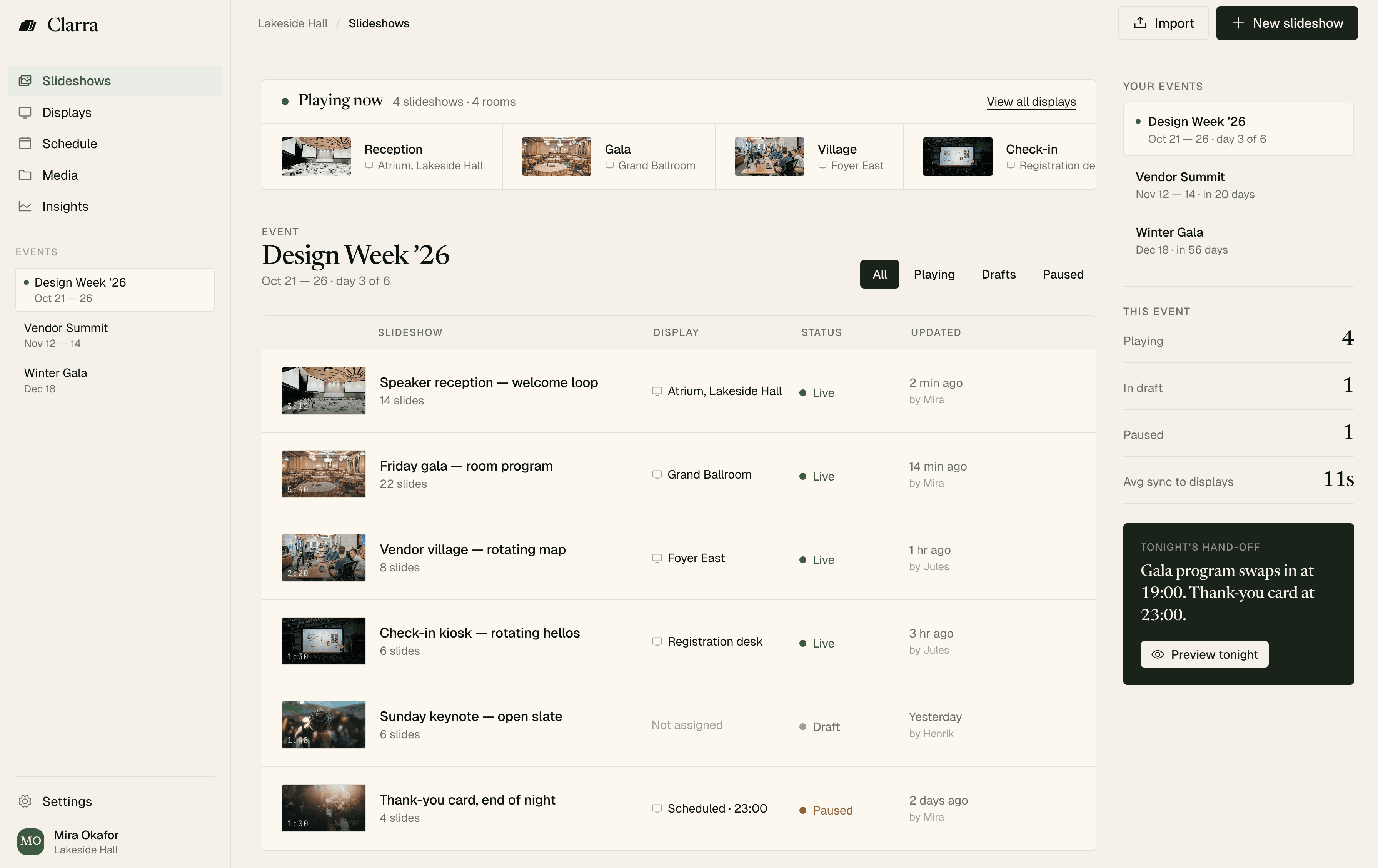
Clarra dashboard — Slideshows view for Design Week '26
Free for one display · Works on any browser · Cancel anytime
Running in galleries, lobbies, and venues everywhere
Lakeside Hall
ATRIUM / NORTH
Fieldhouse
KASTNER+CO
The Fairmont
Design Week
The Problem

Four screens. Three events. Two people who can touch them.

You walk between rooms with a flash drive. You reboot the mezzanine TV, again. The gala starts in forty minutes and nothing on the east wall is right.

Every venue we talked to had the same Sunday night routine: copying files onto sticks, labeling them with tape, praying the stick still works on Monday.

Opening Night / Timeline
without Clarra
06:12
The USB stick is lost. Again.
06:34
The lobby TV is stuck on a screensaver.
06:47
Your producer texts about the ballroom monitor.
06:53
The sponsor logo is on the wrong wall.
With Clarra: one change, every screen catches up in under fifteen seconds.
Use Cases

Built for the places where a screen is part of the room, not the reason for it.

ATRIUM · NORTH
“Works on Paper, 1962–1974” opens Friday at 6.
01Galleries & Museums

Wall labels that keep up with the wall

When a loan arrives, when a piece moves, when hours shift for a private event, one change updates every screen.

  • Portrait and video wall layouts
  • Private-event hours, automated
  • Audit trail for every label change
14s
average label update
The first tool where the screens are never the thing that breaks.
Mira Okafor · Director of Events, Lakeside Hall
LOBBY · EAST
Welcome to the Fairmont. Concierge open until 11.
02Hotels & Lobbies

A quiet welcome, room by room

Spa hours in the lobby. Agendas by the mezzanine. The chef's menu beside the maitre d'.

  • Per-room scheduling and overrides
  • Quiet hours for overnight lobbies
  • Brand-safe templates, no Clarra mark
8 displays
per property, average
Guests notice the screens only because they say the right thing.
Henrik Valle · Programming Lead, Atrium North
FOYER · EAST
Dr. Kemi Adebayo, Keynote at 9:30 am, Grand Hall.
03Events & Conferences

A program that keeps itself

Reception at six. Gala loop at eight. Thank-you card at midnight. Clarra remembers so you don't.

  • Run-of-show timers, per room
  • Sponsor rotations without duplicates
  • Producer and venue-staff roles
47 events
on one fall plan
I schedule a week on Monday morning. Then I forget about it.
Sana Levi · Producer, Kastner + Co
Product

Everything you need, nothing you don’t.

Multi-Event Scheduling
Plan what plays, where, and when — across weeks of overlapping events.
Team Roles
Producers edit, venue staff pause. Every change is logged.
Instant Sync
Edits arrive on every paired display in under 15 seconds.
Offline Safe
A display that loses its connection keeps playing the last loop.
Any Screen, Any Browser
Pair with a short code. No hardware to buy, no app to install.
Drive + Dropbox Sync
Drop files in Google Drive or Dropbox. Clarra picks them up on the screen.
Run-of-Show Timers
Countdown to the next session, the next break, the next bow.
SOC 2, SSO, Audit Log
Enterprise requirements treated as table stakes, not add-ons.
Reviews

The quiet reviews from the people running the rooms.

What venue directors, producers, and curators actually say when they stop having to think about the screen.
G2
4.9
180 reviews
Capterra
4.8
94 reviews
Product Hunt
#3
Product of the Day
NPS
72
from 1,200+ venues
G2
Before Clarra we ran five laptops for three events in one night. Now it's one browser tab and a 20-minute Monday.
MO
Mira Okafor
Director of Events, Lakeside Hall
G2
We stopped walking to the atrium with USB sticks. The screens just update. I still flinch every time I remember how it used to be.
HV
Henrik Valle
Programming Lead, Atrium North
Product Hunt
Pairing a new kiosk takes less than a minute. I keep handing the iPad to interns, just to watch them realize there's nothing hard to learn.
SL
Sana Levi
Producer, Kastner + Co
Capterra
The offline-safe mode saved our gala. The lobby lost WiFi at 7:55 and no one in the room knew until I told them the next day.
PR
Priya Rao
Venue Manager, The Fairmont
G2
Our producers edit, our venue staff pause. The audit log means no one blames the display anymore, which is a real cultural shift.
ML
Marcus Lee
Head of Operations, Design Week PDX
Verified
We priced a signage rebuild at sixty thousand. Clarra replaced the whole plan for the cost of the displays we already owned.
DA
Dr. Anna Brandt
Curator, Fieldhouse Museum
Compared

Most signage tools were built for drive-throughs. Clarra was built for the room.

What you get out of the box, not after three add-ons and a quote.
Clarra
what you want
USB + YouTube
what most venues use
ScreenCloud
built for retail
Yodeck
Raspberry Pi boxes
Runs on Any Browser
No dongles, no boxes, no installs
One Edit Updates Every Screen
Under 15 seconds
Schedule Across Multiple Events
Not just day-parts
Keeps Playing if the Internet Drops
SOC 2, SSO, Audit Log
Included, not an upsell
Priced per Display, Not per Seat
Swipe to compare. Based on public docs as of April 2026. Venues differ. Trials are free.
How It Works

Three movements. An afternoon’s work, at most.

Read the Full Guide
01
Compose the Loop
Drag slides in. Set transitions. Schedule when it should play. Clarra treats each slideshow like a short piece of writing — a few things, in order, well-paced.
02
Pair the Screen
Open clarra.show/screen on any browser — a cheap TV, a kiosk PC, a borrowed laptop. Enter the code. The screen knows what to show and when.
03
Change Your Mind From Anywhere
Swap slides between rooms. Pause the atrium and unpause the foyer. Clarra keeps a record of who changed what, quietly, in the background.
Pricing

Priced per display, not per seat.

Free
For a single display, or while you evaluate.
$0
forever, one display
  • 1 display
  • 3 slideshows
  • Clarra watermark on-screen
  • Email support
Free forever · no upgrade nags
MOST POPULAR
Studio
For galleries, hotels, and small venues.
$19
per display / month
  • Up to 5 displays
  • Unlimited slideshows
  • Public preview links
  • Google Drive + Dropbox sync
  • No Clarra branding
  • Email support
14 days free · cancel anytime
Venue
For organizations running simultaneous events.
$29
per display / month
  • Unlimited displays
  • Scheduling + automations
  • Team roles & seats
  • Insights + priority sync
  • 100 GB storage
  • Priority support
14 days free · cancel anytime
Questions

Before you ask.

What hardware do I need?
Anything with a browser. A cheap TV with a streaming stick, a kiosk PC, a spare laptop — all work. Pair it with a short code at clarra.show/screen.
What happens if the display loses internet?
Can multiple people on my team edit at once?
Do you support vertical displays and video walls?
How fast do edits reach the screen?

Start with one display. Free, and as long as you like.

No credit card. Upgrade when you’re ready.
Clarra
Slideshow software for the screen in the corner of the room.
Product
Use Cases
Company
Support